
Case Study Description
Designed and implemented an incremental data ingestion pipeline using Microsoft Fabric to modernize logistics data processing for a global freight company. The solution automated ingestion of high-volume JSON shipment logs using a watermark-based state management approach, eliminating manual file selection, reducing reporting latency, and ensuring reliable, auditable data ingestion into a Delta Lake architecture.
Project Scope
Developed an end-to-end incremental data ingestion pipeline that automates JSON file processing, tracks ingestion state using watermarks, stores data in Delta Lake, and delivers reliable, scalable, and auditable data for downstream analytics.
Objectives
-
Automate incremental data ingestion.
-
Process only new shipment files.
-
Eliminate duplicate and missed records.
-
Improve data reliability and auditability.
-
Reduce reporting latency through automated pipelines.
Challenges
-
The Post-Trigger File
-
The Silent Column
-
The Contaminated Table
Solution
Data Pipeline Architecture & Workflow

Steps Involve in setting Data Pipeline Architecture & workflow

1. Create Watermark Log Table (SQL):
Designed a SQL table to track the last processed timestamp and manage the pipeline's incremental state.

3. Automate Watermark Updates:
Configured an UPDATE query to execute at the end of each successful pipeline run, advancing the timestamp to log the new state.
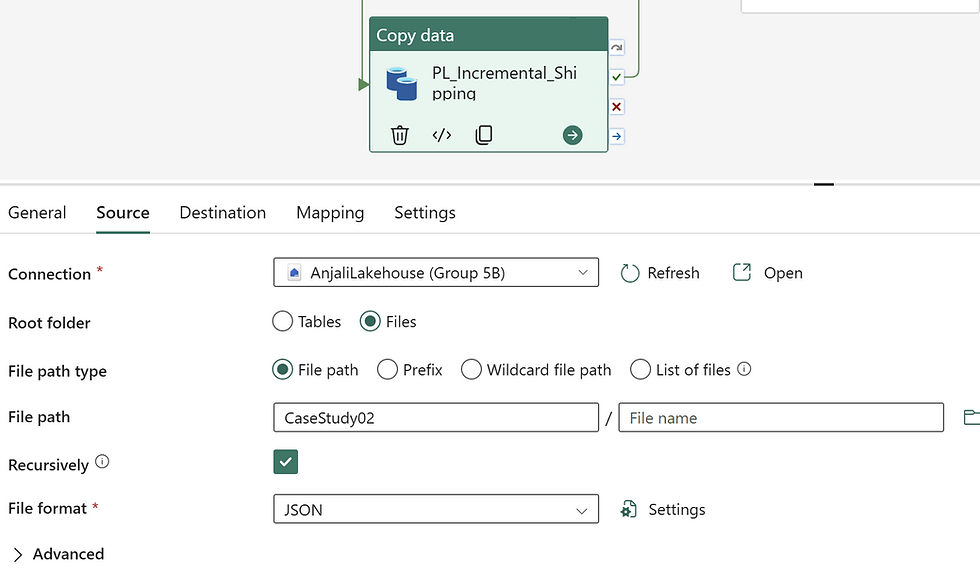
5. Configure the Incremental Data Flow:
Set up the core extraction logic (via a Copy or Data Flow activity) to filter the source data using the retrieved watermark timestamp. This ensures the pipeline pulls only newly arrived files and cleanly appends them to the main Delta Lake table without duplication.

2. Seed Baseline Watermark:
Executed a SQL INSERT statement to populate the initial timestamp value, establishing the starting baseline for the incremental load.

4. Configure the Lookup Activity:
Set up a Lookup activity to watermark log table and retrieve the last successfully processed watermark timestamp. This establishes the starting point for the current pipeline run.

6. Configure the Watermark Update (Notebook Activity):
Set up a Notebook activity parameterized to receive the dynamic pipeline trigger time. Upon successful data ingestion, the notebook executes a script to update the watermark log table with this new timestamp, resetting the baseline for the next run.
-
Initialize State: Looked up the previous watermark timestamp to identify the exact starting point for data extraction.
-
Incremental Load: Filtered and extracted only newly arrived data based on the watermark, appending unique records to the master file.
-
Advance Watermark: Automated a query to update the watermark log with the pipeline's trigger timestamp post-execution.
CHALLENGE 01
The Post-Trigger File
It is 6:03 AM. The pipeline has run. At 8:47 AM, a carrier uploads a new file containing the status update David needs for his 9:00 AM report. What happens?
Solution: No, it will not be picked up by today's pipeline. Assuming the pipeline operates on a daily morning schedule, it already completed its run at 6:03 AM. Because the pipeline is triggered by a schedule rather than an event (like a file dropping), it is currently inactive. The file will sit safely in the landing zone and will be ingested during tomorrow’s scheduled run (e.g., tomorrow at 6:00 AM).
The Silent Column
CHALLENGE 02
The carrier integration team adds an InsuranceValue field to all JSON files over the weekend. Monday's pipeline succeeds without error. The field is nowhere in the table.

1. Update Schema: Execute a SQL command on the destination Delta table to add the missing field "InsuranceValue"