
Case Study Description
Designed and implemented an end-to-end Microsoft Fabric data engineering solution for a global luxury real estate company to automate property listing ingestion from multiple regional offices. The solution replaced manual spreadsheet consolidation with a scalable, governed, and auditable pipeline, delivering reliable, near real-time data for business intelligence and executive decision-making.
Technologies Used
Microsoft Fabric || Lakehouse || Data Factory Pipelines || Copy Data Activity || Incremental Upsert || Pipeline Scheduling || Data Validation & Audit Logging
Project Scope
-
Designed a Lakehouse-centric data engineering architecture for centralized property listing management.
-
Automated ingestion of nightly CSV files from London, Dubai, and New York using wildcard-based pipelines.
-
Built an end-to-end ETL pipeline to validate, transform, and load data into a governed Silver layer.
-
Implemented upsert logic to maintain a single authoritative record per property.
-
Added audit timestamps, PII exclusion, automated file archival, and landing zone cleanup to ensure governance and data quality.
-
Delivered a production-ready pipeline with automated scheduling, monitoring, and scalability to support future office onboarding without structural changes.
Challenges
-
The Singapore Expansion
-
The Late Correction
-
The Vanishing Column
-
The Broken Chain
-
The Missing Office
Solution
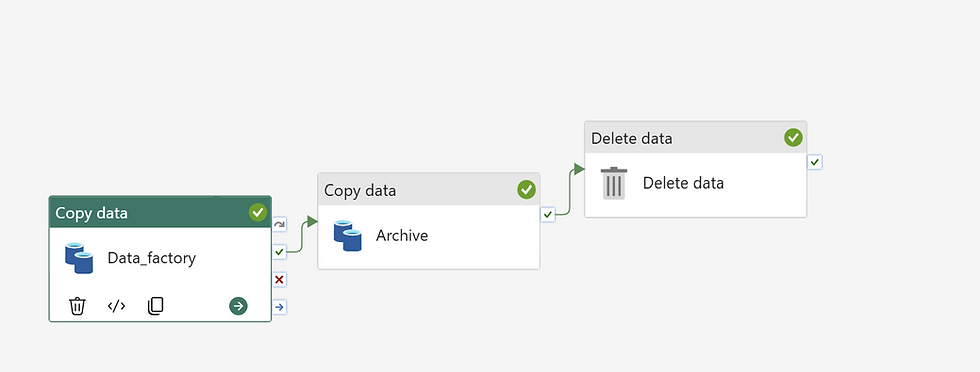
Data Pipeline Architecture & Workflow
C H A L L E N G E 0 2
Steps Involve in setting Data Pipeline Architecture & workflow
1. Data_Factory


2. Archive

C H A L L E N G E 0 1
3. Delete Data

The Singapore Expansion
A new office begins dropping files into the landing zone next Monday. Does the pipeline need to be modified before then? You have not changed it since go-live.
Solution: No, the pipeline does not require any modifications. The architecture was designed to be fully dynamic and scalable from day one.
Why the Pipeline Handles This Automatically:
-
Wildcard File Matching: The Source configuration in the copy activity uses a wildcard file name pattern (e.g., office_*.csv). When the new office file drops its data into the landing zone, the pipeline will automatically detect and ingest the new file without manual code changes.
-
Upsert Logic: The Sink configuration uses an upsert mechanism. When the new data is processed next morning, the pipeline will cleanly insert the new property records and update any existing ones in the Main Data File without creating duplicates.
-
Automated Cycle Management: The downstream Archive and Delete data activities will process, back up, and purge the new file sequentially, exactly like the existing office files.

The Late Correction
Dubai contacts you at 11:30 PM to report an incorrect listing price already sitting in Silver. They drop a corrected file with a different filename. What happens when you run it?
Solution: The pipeline will automatically pick up the corrected file and update the records seamlessly without any manual intervention.
Why the Pipeline Handles This Automatically:
-
Wildcard File Matching: Because the Source configuration uses a dynamic wildcard pattern (e.g., office_*.csv), the pipeline is not locked into a specific, rigid filename. It will instantly recognize and ingest the newly dropped correction file during the next execution cycle.
-
Target Upsert Mechanism: The Sink configuration uses an upsert (update/insert) logic based on the unique Property ID. Instead of creating duplicate rows or failing due to a naming mismatch, the pipeline matches the keys and cleanly overwrites the incorrect listing price in the Main Data File with the new, corrected values.
-
Clean State Maintenance: After successful ingestion and archival, the downstream Delete data activity purges the new correction file from the landing zone, ensuring the directory is reset and ready for the next scheduled run.

The pipeline executes three activities sequentially:
-
Data_factory (Copy Data): Ingests and updates data from the Landing folder to the Main Data File.
-
Archive (Copy Data): Moves the processed files from the Landing folder to the Archive folder for historical tracking.
-
Delete data (Delete): Clears all remaining files out of the Landing folder to reset it for the next run.